Operating Network Services and VNF Instances
VNF configuration is done in three “days”:
Day-0: The machine gets ready to be managed (e.g. import ssh-keys, create users/pass, network configuration, etc.)
Day-1: The machine gets configured for providing services (e.g.: Install packages, edit config files, execute commands, etc.)
Day-2: The machine configuration and management is updated (e.g.: Do on-demand actions, like dump logs, backup databases, update users etc.)
In OSM, Day-0 is usually covered by cloud-init, as it just implies basic configurations.
Day-1 and Day-2 are both managed by the VCA (VNF Configuration & Abstraction) module, which consists of a Juju Controller that interacts with VNFs through “charms”, a generic set of scripts for deploying and operating software which can be adapted to any use case.
There are two types of charms:
Native charms: the set of scripts run inside the VNF components.
Proxy charms: the set of scripts run in LXC containers in an OSM-managed machine (which could be where OSM resides), which use ssh or other methods to get into the VNF instances and configure them.
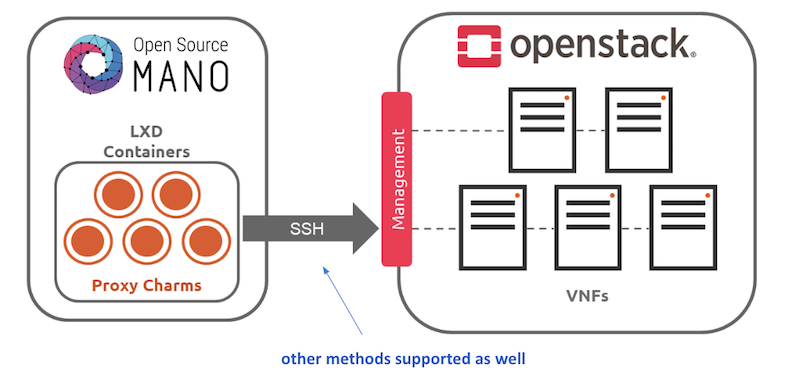
These charms can run with three scopes:
VDU: running a per-vdu charm, with individual actions for each.
VNF: running globally for the VNF, for the management VDU that represents it.
NS: running for the whole NS, after VNFs have been configured, to handle interactions between them.
Depending on the scope of charms, the charm application naming differs:
The VNF level charm application name is prepared by combining the relevant execution environment name and vnf-profile-id.
The VDU level charm application name includes vdu-profile-id as an identifier together with the relevant execution environment name and vnf-profile-id that it belongs.
The NS level charm application name is identified with the charm name.
The structure of charm application name makes the charm more apparent. Besides, it makes the VDU/KDU more visible by looking through the related charm. The structure of charm application names which are limited with 50 characters, are described below according to scope of charms:
NS level: <charm-name>-ns
VNF level: <ee-name>-z<vnf-ordinal-scale-number>-<vnf-profile-id>-vnf
VDU level: <ee-name>-z<vnf-ordinal-scale-number>-<vnf-profile-id>-<vdu-profile-id>-z<vdu-ordinal-scale-number>-vdu
For detailed instructions on how to add cloud-init or charms to your VNF, visit the following references:
Subscription and Notification support in OSM
ETSI NFV SOL005 defines a class of Northbound APIs through which entities can subscribe for changes in the Network Service (NS) life-cycle, Network service descriptor (NSD) and Virtual network service descriptor (VNFD). The entities get notified via HTTP REST APIs which those entities expose.
Since the current support is only restricted to NS, while NSD and VNFD are in roadmap, for here onwards we will refer subscription and notification for NS.
The entities which are interested to know the life-cycle changes of network service are called Subscribers.
Subscribers receive messages called notifications when an event of their interest occurs.
SOL005 specifies usage of filters in the registration phase, through which subscribers can select events and NS they are interested in.
Subscribers can choose the authentication mechanism of their notification receiver endpoint.
Events need to be notified with very little latency and make them near real-time.
Deregistration of subscription should be possible however subscribers can not modify existing subscriptions as per SOL005.
NS Subscription And Notification
Steps for subscription
Step 1: Get bearer token.
NBI API: https://<osm_ip>:9999/osm/admin/v1/tokens/
Sample payload
{
    "username": "admin",
    "password": "admin",
    "project": "admin"
}
Step 2: Select for events for which you are interested in and prepare payload.
Please check the Kafka messages for the filter scenario. If kafka message is not of the format, which contain operation state and operation type. If message does not contain operation state and operation type notification will not be raised.**
Kafka messages will be improved in future.
{_admin: {created: 1579592163.561016, modified: 1579592163.561016, projects_read: [
894160c9-1ead-4c85-9742-e7453260ea5f], projects_write: [894160c9-1ead-4c85-9742-e7453260ea5f]},
_id: 5c53f989-defc-4f93-8ab9-93c62136c37e, id: 5c53f989-defc-4f93-8ab9-93c62136c37e,
isAutomaticInvocation: false, isCancelPending: false, lcmOperationType: instantiate,
links: {nsInstance: /osm/nslcm/v1/ns_instances/35f7ae25-2cf6-4a63-8388-a114513198ed,
    self: /osm/nslcm/v1/ns_lcm_op_occs/5c53f989-defc-4f93-8ab9-93c62136c37e}, nsInstanceId: 35f7ae25-2cf6-4a63-8388-a114513198ed,
operationParams: {lcmOperationType: instantiate, nsDescription: testing, nsInstanceId: 35f7ae25-2cf6-4a63-8388-a114513198ed,
    nsName: check, nsdId: f445b11a-63d8-44b3-85a8-b4b864ccccd6, nsr_id: 35f7ae25-2cf6-4a63-8388-a114513198ed,
    ssh_keys: [], vimAccountId: d5d59b88-7015-4f4b-8df6-bd05765cfa25}, operationState: PROCESSING,
startTime: 1579592163.5609882, statusEnteredTime: 1579592163.5609882}
Refer ETSI SOL005 document for filter options Page no 154. Below an example of payload:
{
    "filter": {
        "nsInstanceSubscriptionFilter": {
            "nsdIds": [
                "93b3c041-cac4-4ef3-8ad6-400fbad32a90"
            ]
        },
        "notificationTypes": [
            "NsLcmOperationOccurrenceNotification"
        ],
        "operationTypes": [
            "INSTANTIATE"
        ],
        "operationStates": [
            "PROCESSING"
        ]
    },
    "CallbackUri": "http://192.168.61.143:5050/notifications",
    "authentication": {
        "authType": "basic",
        "paramsBasic": {
            "userName": "user",
            "password": "user"
        }
    }
}
This payload implies that, for nsd id 93b3c041-cac4-4ef3-8ad6-400fbad32a90 if operation state is PROCESSING and operation type is INSTANTIATE then, send a notification to http://192.168.61.143:5050/notifications using the “authentication” mechanism whose payload is of datatype NsLcmOperationOccurrenceNotification.
Step 3: Send an HTTPS POST request to create subscription.
Add the bearer token as authentication parameter from step 1.
Payload from step 2 to https://<osm_ip>:9999/osm/nslcm/v1/subscriptions
Step 4: Verify successful registration of subscription
Send an HTTPS GET request https://<osm_ip>:9999/osm/nslcm/v1/subscriptions
Steps for notification
__Step 1: Create an event in osm satisfying the filter criteria.
For instance, you can launch any NS. This event has operation state as PROCESSING and operation type as INSTANTIATE, when network service is just launched.
Step 2: See the notification in notification receiver.
Current support and future roadmap
Current support
Subscriptions for NS lifecycle:
JSON schema validation
Pre-chech of notification endpoint
Duplicate subscription detection
Notifications for NS lifecycle:
SOL005 compliant structure for each subscriber according to their filters and authentication types.
POST events to notification endpoints.
Retry and backoff for failed notifications.
Future roadmap
Integration of subscription steps in NG-UI.
Support for OAuth and TLS authentication types for notification endpoint.
Support for subscription and notification for NSD.
Support for subscription and notification for VNFD.
Cache to store subscribers.
How to cancel an ongoing operation over a NS
The OSM client command ns-op-cancel allows to cancel any ongoing operation of Network Service. For instance, to cancel the instantiation of a NS execute the following steps:
Create the NS with
osm ns-createand save the Network Service ID (NS_ID)Obtain the Operation ID of the NS instantiation with
osm ns-op-list NS_IDCancel the operation with
osm ns-op-cancel OP_IDThe NS will be in
FAILED_TEMPstatus.
Be aware that resources created before the cancellation will not be rolled back and the Network Service could be unhealthy.
If some operation is blocked due to an ungraceful restart of LCM module, you can use this command to delete the operation and unblock the Network Service.
Queued (unstarted) operations can also be deleted with this command.
Start, Stop and Rebuild operations over a VDU of a running VNF instance
These three operations involves starting , stopping, and rebuilding of a VDU on a running VNF instance by using the NGUI.
OSM allows these three operations over VDUs for all supported VIMs.
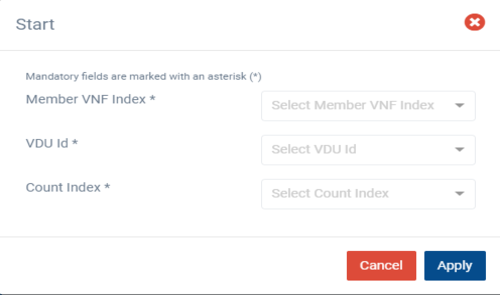
Start Operation:
Start operation lets you start one VNF instance at a time and that instance should be in shutoff state.
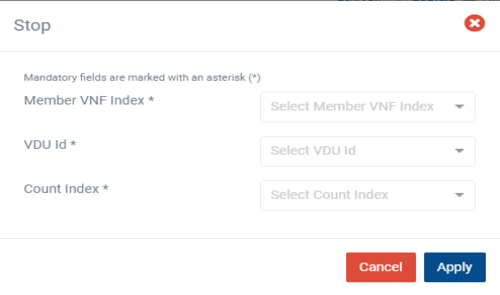
Stop Operation:
Stop operation lets you stop one VNF instance at a time and that instance should be in running state.
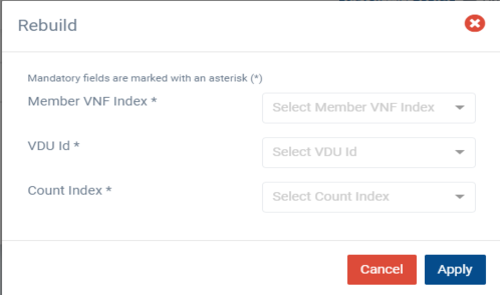
Rebuild Operation:
Rebuild operation lets you rebuild one VNF instance at a time and in this operation, the instance can be in either running or shutoff state.
Additional Notes
Each operation is executed independently and only one at a time.
In the rebuild operation, we are not deleting the target VDU nor we are recreating it. The VDU will be rebuilt by using the existing image, so actual properties of the VDU are preserved like name and IP addresses.
How to perform operation from UI
From OSM’s user action menu select the operation (start, stop, rebuild), select the Member VNF index, select the VDU id and Count Index for the target VDU, then select apply. This will trigger the operation.
Future roadmap
Implementation of day-1 operation for rebuild operation is in roadmap.
Migrating VDUs in a Network Service
OSM allows the migration of VDUs, that are part of a VNF, across compute hosts.
The following scenarios are possible:
Migrating a single, specific VDU
Migrating a specific VDU that is part of a scaling group
Migrating all VDU instances in a VNF
The VDUs can be migrated across compute hosts. But, the new compute host should belong to the same availability zone as the current compute host that the VDU belongs to before migration. This is enforced to ensure the validity of placement-groups configuration even after migration.
In case the new compute host is not provided, then a compute host would be selected automatically from the same availability zone.
Additional Notes
OSM currently supports migration of VDUs for OpenStack VIM type only.
Performing Migration from UI
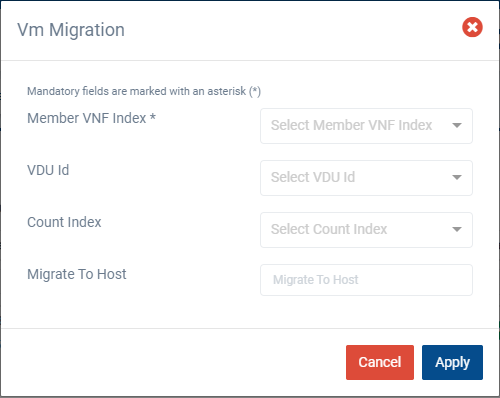
In Migration, ‘Member VNF Index’ is the only mandatory parameter and it is used to identify the VNF to be migrated. If no other parameters are provided, then all the VDUs in the VNF are migrated appropriately.
To migrate a specific VDU that is part of a scaling group, both the ‘VDU Id’ and ‘Count Index’ parameters are required. For VDUs that are not scaled, VDU-Id parameter would suffice.
To migrate to a specific host, ‘Migrate To Host’ parameter has to be provided. If it is not provided, then a compute host would be selected automatically.
From the UI:
Go to ‘NS Instances’ on the ‘Instances’ menu to the left
Next, in the NS instance where the VNF to be migrated is a part of, click on the ‘Action’ button.
From the dropdown actions, click on ‘Vm Migration’
Fill in the form, adding at least the member vnf index:
Service Function Chaining
SFC has the ability to cause network packet flows to route through a network via a path other than the one that would be chosen by routing table lookups on the packet’s destination IP address.
How to deploy Service Function Chaining
To illustrate how SFC works in OSM, it will be discussed in the below example.
Resources
This example of SFC requires a set of resources (VNFs, NSs) that are available in the following Gitlab osm-packages repository:
Virtual Network Functions
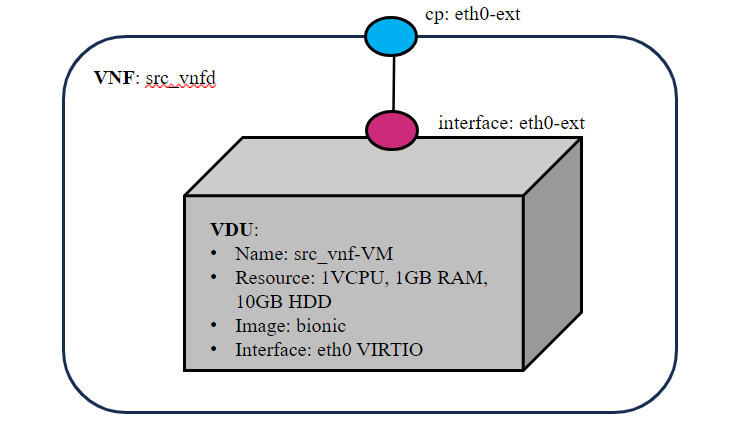
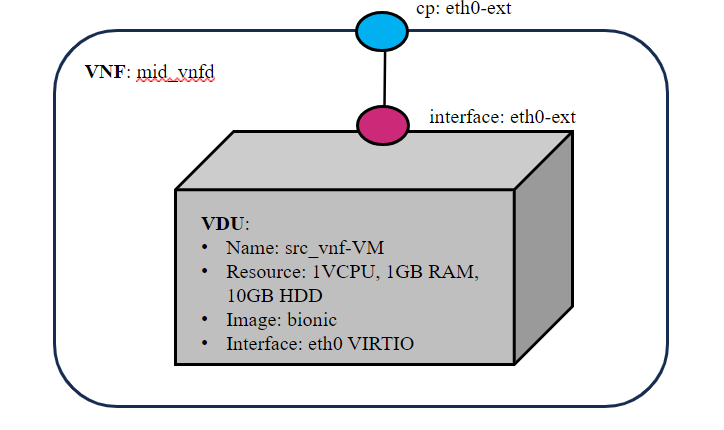
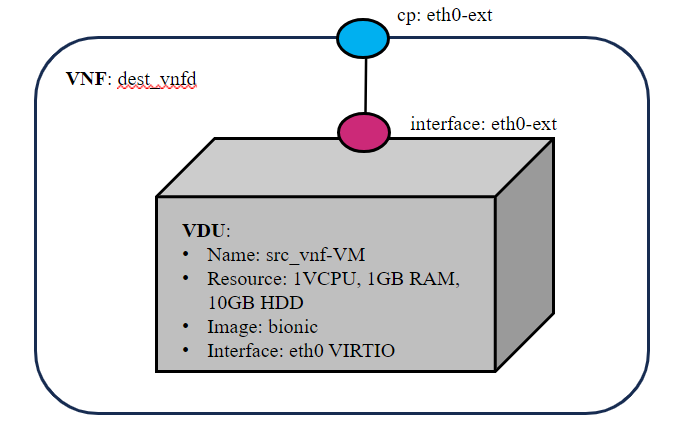
Three VNFs are used for this example. All the VNFs has single interface (eth0-ext), specifications vCPU (1), RAM (1GB), disk (10GB), and image-name (bionic).
Network Service
This Network service has three VNFs.The VNF forwarding graph parameters like match attributes (source ip address, destination ip address, protocol, source port, destination port), ingress connection point interface (packet in) and egress connection point interface (packet out) are configured in NSD descriptor.
The diagram below shows the sfc_nsd and service chaining of VNFs.
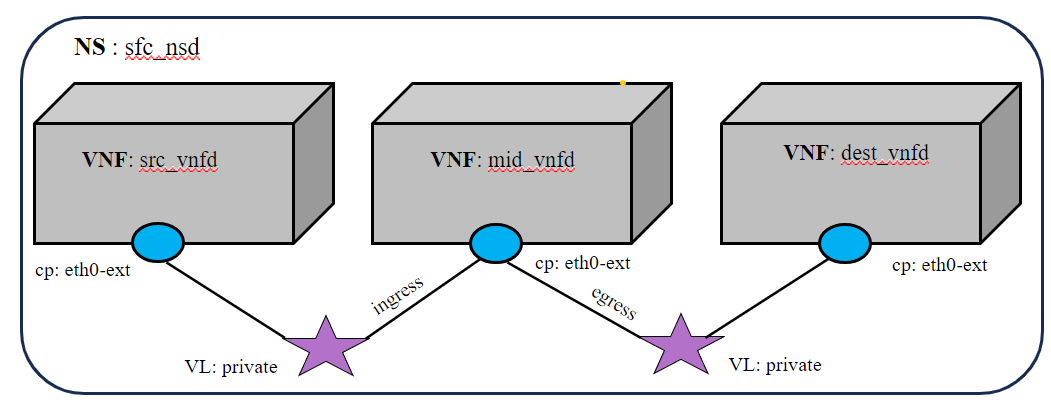
SFC Network service Descriptor
VNFFGD configuration are specified as below in NS descriptor:
    vnffgd:
    - id: vnffg1
      vnf-profile-id:
      - vnf2
      nfp-position-element:
      - id: test
      nfpd:
      - id: forwardingpath1
        position-desc-id:
        - id: position1
          nfp-position-element-id:
          - test
          match-attributes:
          -  id: rule1_80
             ip-proto: 6
             source-ip-address:  20.20.20.10
             destination-ip-address: 20.20.20.30
             source-port: 0
             destination-port: 80
             constituent-base-element-id: vnf1
             constituent-cpd-id: eth0-ext
          cp-profile-id:
          -  id: cpprofile2
             constituent-profile-elements:
             - id: cp1
               order: 0
               constituent-base-element-id: vnf2
               ingress-constituent-cpd-id: eth0-ext
               egress-constituent-cpd-id: eth0-ext
The list of VNFs in the forwarding graph (
vnffgd:vnf-profile-id)Source IP address in CIDR notation (
match-attributes:source-ip-address)Source IP address in CIDR notation (
match-attributes:destination-ip-address)Source protocol port (allowed range [1,65535])(
match-attributes:source-port)Destination protocol port (allowed range [1,65535(
match-attributes:destination-port)IP protocol name. Protocol name should be as per IANA standard (
match-attributes:ip-proto)
Example
Get the descriptors:
git clone --recursive https://osm.etsi.org/gitlab/vnf-onboarding/osm-packages.git
Onboard them:
cd osm-packages
osm vnfpkg-create src_vnfd
osm vnfpkg-create mid_vnfd
osm vnfpkg-create dest_vnfd
osm nspkg-create sfc_nsd
Launch the NS:
osm ns-create --ns_name sfc --nsd_name sfc_nsd --vim_account <VIM_ACCOUNT_NAME>|<VIM_ACCOUNT_ID>
osm ns-list
Testing
# In src_vnf and dest_vnf install the netcat
sudo apt install netcat -y
# In mid_vnf install tcpdump and run the tcpdump command to start the packet capture
sudo apt install tcpdump -y
sudo tcpdump -i <interface name>
# In dest_vnf, open a listener on port 90, waiting for a client to connect
sudo nc -l -p 90
# In src_vnf, run the below command. This command will connect to the server at <dest_vnf> ip-address on port 90
sudo nc <dest_vnf_ip_address> 90
# All the packets from src vnf to dest vnf should route only through the mid vnf.