Healing Network Services and VNF Instances
Reference diagram
The following diagram summarizes the feature:
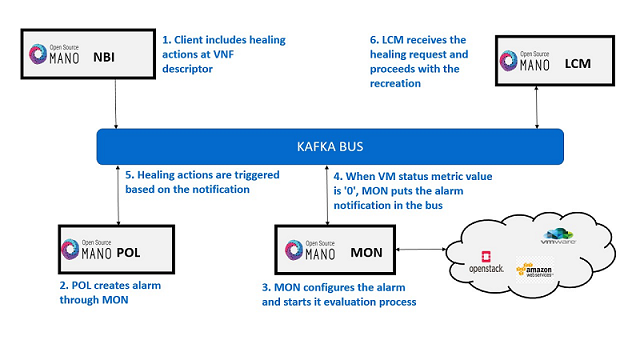
Healing descriptors can be included and be tied to automatic reaction to VM metric thresholds.
An internal alarm manager has been added to MON through the ‘mon-evaluator’ module, so VM metrics can trigger threshold-violation alarms when VM is in
ERROR/DELETEstate and perform healing actions.
Healing Descriptor
The healing descriptor is part of a VNFD. Like the example below shows, it mainly specifies:
The VDU to be healed (
healing-policy:vdu-id)The healing recovery option (
action-on-recovery)The minimum time it should pass between healing operations (
cooldown-time)To run day1 primitives for VDU (
day1)
healing-aspect:
-   id: autoheal_vnfd-VM_autoheal
    healing-policy:
    - vdu-id: autoheal_vnfd-VM
      event-name: heal-alarm
      recovery-type: automatic
      action-on-recovery: REDEPLOY_ONLY
      cooldown-time: 180
      day1: false
Example
Get the descriptors:
git clone --recursive https://osm.etsi.org/gitlab/vnf-onboarding/osm-packages.git
Onboard them:
cd osm-packages
osm vnfpkg-create autoheal_vnf
osm nspkg-create autoheal_ns
Launch the NS:
osm ns-create --ns_name heal --nsd_name autoheal_nsd --vim_account <VIM_ACCOUNT_NAME>|<VIM_ACCOUNT_ID>
osm ns-list
osm ns-show heal
How to enable/disable autohealing
With the previous SA architecture, it is possible to enable/disable autohealing by patching the POL deployment in kubernetes:
The steps are given below:
To enable the autohealing feature
change the env
OSMPOL_AUTOHEAL_ENABLEDtoTruein devops dockerfile.To enable during runtime, in pol deployment file modify the env
OSMPOL_AUTOHEAL_ENABLEDtoTrue.kubectl -n osm edit deployment pol
   - env:
       - name: OSMPOL_AUTOHEAL_ENABLED
         value: True
To disable the autohealing feature
change the env
OSMPOL_AUTOHEAL_ENABLEDtoFalsein devops dockerfile.To disable during runtime, in pol deployment file modify the env
OSMPOL_AUTOHEAL_ENABLEDtoFalse.kubectl -n osm edit deployment pol
   - env:
       - name: OSMPOL_AUTOHEAL_ENABLED
         value: False
With the new architecture, Airflow DAGs for healing can be selectively disabled in Airflow UI by pressing the toggle next to the DAG to pause/unpause it:
- vdu_down, to enable/disable auto-heal
Testing:
To ensure NS is instantiated successfully, check metrics at Prometheus, visit
http://[OSM_IP]:9091and look forosm_vm_status. Metric value should be ‘1’.Run the following openstack commands to induce and error or delete a VM:
# To test healing in error state, induce error state in vm
openstack server set --state error <server-id>
# To test healing in deleted state, delete the vm
openstack server delete <server-id>
Check metrics at Prometheus, visit
http://[OSM_IP]:9091and look forosm_vm_status. Metric value should be ‘0’.Heal operation will be triggered at POL and VM respawn will happen.