Deploying Network Services and VNF Instances
How to deploy your first Network Service
Before going on, clone VNF and NS packages from Gitlab osm-packages repository
git clone --recursive https://osm.etsi.org/gitlab/vnf-onboarding/osm-packages.git
Onboarding a VNF package
The onboarding of a VNF in OSM involves preparing and adding the corre sponding VNF package to the system. This process also assumes, as a pre-condition, that the corresponding VM images are available in the VIM(s) where it will be instantiated.
Uploading VM image(s) to the VIM(s)
In this example, only a vanilla Ubuntu18.04 image is needed. It can be obtained from the following link: https://cloud-images.ubuntu.com/bionic/current/bionic-server-cloudimg-amd64.img
It will be required to upload the image into the VIM. Instructions differ from one VIM to another (please check the reference of your type of VIM).
For instance, this is the OpenStack command for uploading images:
openstack image create --file="./bionic-server-cloudimg-amd64.img" --container-format=bare ubuntu18.04
Onboarding a VNF Package
From the UI:
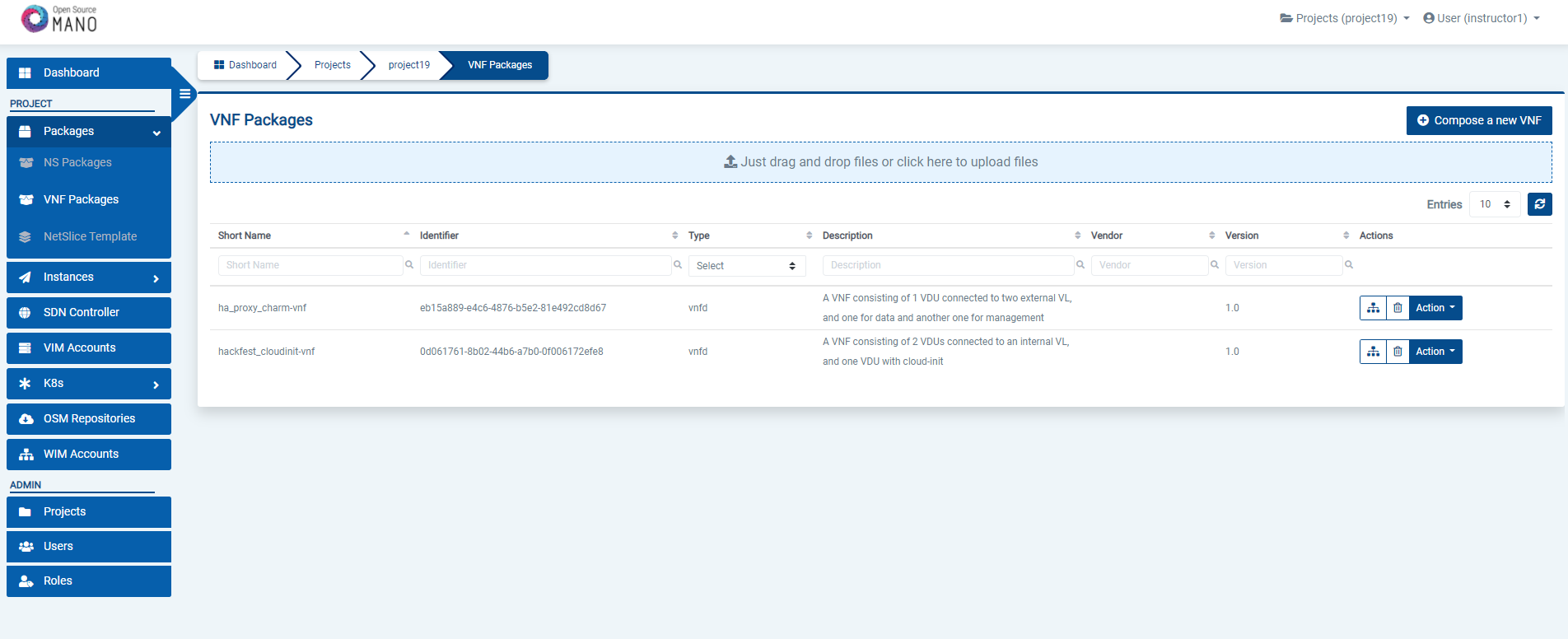
Go to ‘VNF Packages’ on the ‘Packages’ menu to the left
Drag and drop the VNF package file
hackfest_basic_vnf.tar.gzin the importing area.
From OSM client:
git clone --recursive https://osm.etsi.org/gitlab/vnf-onboarding/osm-packages.git
cd osm-packages
osm nfpkg-create hackfest_basic_vnf
osm nfpkg-list
Onboarding a NS Package
From the UI:
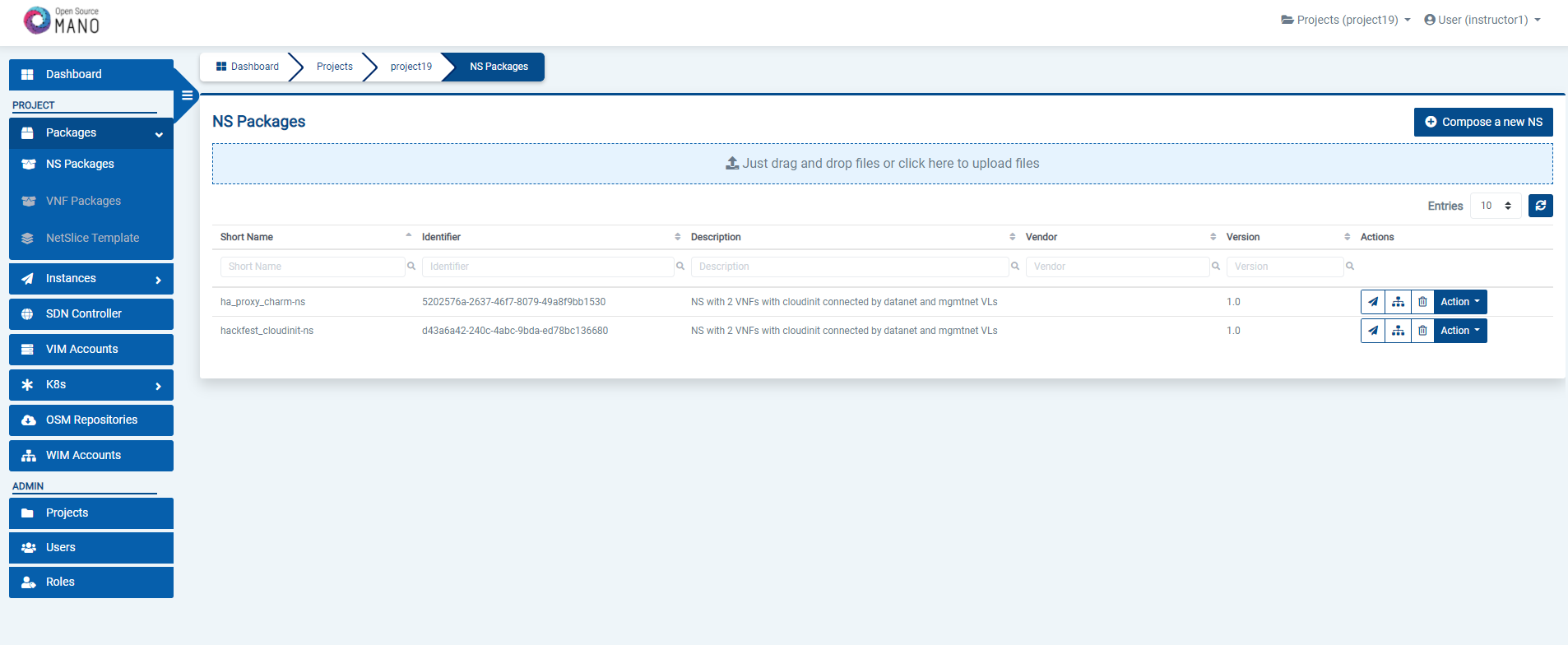
Go to ‘NS Packages’ on the ‘Packages’ menu to the left
Drag and drop the NS package file
hackfest_basic_ns.tar.gzin the importing area.
From OSM client:
cd osm-packages
osm nspkg-create hackfest_basic_ns
osm nspkg-list
Instantiating the NS
Instantiating a NS from the UI
Go to ‘NS Packages’ on the ‘Packages’ menu to the left
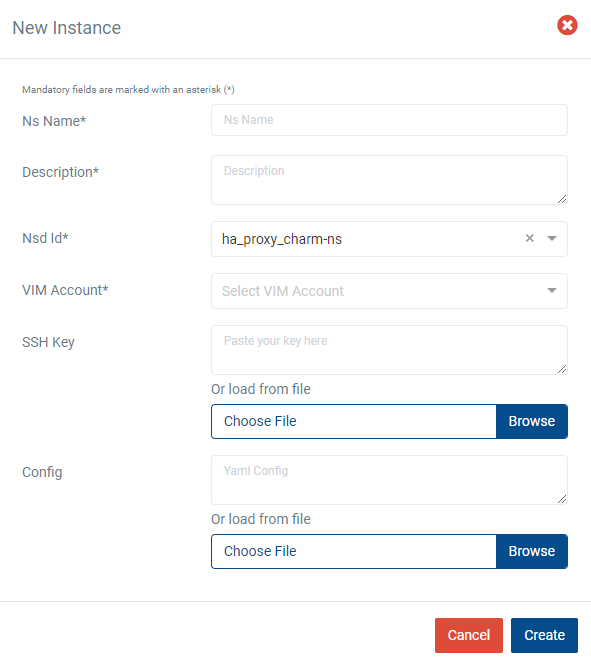
Next the NS descriptor to be instantiated, click on the ‘Instantiate NS’ button.

Fill in the form, adding at least a name, description and selecting the VIM:
Instantiating a NS from the OSM client
osm ns-create --ns_name <ns-instance-name> --nsd_name hackfest_basic-ns --vim_account <vim-target-name>
osm ns-list
How to update the VNF instance in a Network Service
If you have an active network service and you would like to update the one of your running VNF instances, you can follow the below steps in order to update it.
Update the VNF package
To be able update the NS instance, first we need to create a new revision of the VNFd package that has the changes we want to perform in our NS. The existing VNFD can be updated by executing the following command through the CLI.
osm vnfpkg-update --content <new_vnfd_package> <vnfd_package_name_to_be_updated>
Example:
osm vnfpkg-update --content ha_proxy_charm_vnf ha_proxy_charm-vnf
You can modify your VNFD according to the update type you would like to apply.
There are 2 supported update types:
CHANGE_VNFPKG
REMOVE_VNF
CHANGE_VNFPKG Update
CHANGE_VNFPKG update type provides following operations on a running VNF instance:
Redeploy the VNF
Upgrade the charms in the VNF
Update the policies
Alterable parameters in VNFD for redeployment
There is a distinctive parameter named software-version in VNF descriptor which is used to dissociate the CHANGE_VNFPKG update type operations.
If the updated package software-version has changed and the original VNFD does not include a charm, the VNF is redeployed (the redeployment is only available right now for NFs that don’t include charms).
If the software-version is not placed in the VNFD, it is taken as 1.0 by default.
At that time, most of the parameters could be changed in the modified VNF package except the parameters which are refered in NSD.
vnfd:
  id: ha_proxy_charm-vnf
  mgmt-cp: vnf-mgmt-ext
  product-name: ha_proxy_charm-vnf
  description: A VNF consisting of 1 VDU
    data and another one for management
  version: 1.0
  software-version: 1.0
Alterable parameters in VNFD for charm upgrade in the VNF Instance
The charm upgrade in a running VNF instance is supported unless the running VNF is a juju-bundle.
Only the parameter changes of day1-2 operations are allowed for charm upgrade operations.
Here are the alterable parameters in the VNFD for charm upgrade operations:
All day1-2:initial-config-primitives are allowed to change.
    |  +--rw lcm-operations-configuration
    |  |  +--rw operate-vnf-op-config
    |  |  |     +--rw day1-2:initial-config-primitive* [seq]
    |  |  |     |  +--rw day1-2:seq                                uint64
    |  |  |     |  +--rw (day1-2:primitive-type)?
    |  |  |     |     +--:(day1-2:primitive-definition)
    |  |  |     |        +--rw day1-2:name?                        string
    |  |  |     |        +--rw day1-2:execution-environment-ref?   -> ../../execution-environment-list/id
    |  |  |     |        +--rw day1-2:parameter* [name]
    |  |  |     |        |  +--rw day1-2:name         string
    |  |  |     |        |  +--rw day1-2:data-type?   common:parameter-data-type
    |  |  |     |        |  +--rw day1-2:value?       string
    |  |  |     |        +--rw day1-2:user-defined-script?         string
All day1-2:config-primitives are allowed to change.
    |  +--rw lcm-operations-configuration
    |  |  +--rw operate-vnf-op-config
    |  |  |     +--rw day1-2:config-primitive* [name]
    |  |  |     |  +--rw day1-2:name                               string
    |  |  |     |  +--rw day1-2:execution-environment-ref?         -> ../../execution-environment-list/id
    |  |  |     |  +--rw day1-2:execution-environment-primitive?   string
    |  |  |     |  +--rw day1-2:parameter* [name]
    |  |  |     |  |  +--rw day1-2:name              string
    |  |  |     |  |  +--rw day1-2:data-type?        common:parameter-data-type
    |  |  |     |  |  +--rw day1-2:mandatory?        boolean
    |  |  |     |  |  +--rw day1-2:default-value?    string
    |  |  |     |  |  +--rw day1-2:parameter-pool?   string
    |  |  |     |  |  +--rw day1-2:read-only?        boolean
    |  |  |     |  |  +--rw day1-2:hidden?           boolean
    |  |  |     |  +--rw day1-2:user-defined-script?               string
All day1-2:terminate-config-primitives are allowed to change.
    |  +--rw lcm-operations-configuration
    |  |  +--rw operate-vnf-op-config
    |  |  |     +--rw day1-2:terminate-config-primitive* [seq]
    |  |  |     |  +--rw day1-2:seq                          uint64
    |  |  |     |  +--rw day1-2:name?                        string
    |  |  |     |  +--rw day1-2:execution-environment-ref?   -> ../../execution-environment-list/id
    |  |  |     |  +--rw day1-2:parameter* [name]
    |  |  |     |  |  +--rw day1-2:name         string
    |  |  |     |  |  +--rw day1-2:data-type?   common:parameter-data-type
    |  |  |     |  |  +--rw day1-2:value?       string
    |  |  |     |  +--rw day1-2:user-defined-script?         string
Alterable parameters for policy updates
Policy update changes are performed on running VNF instance unless software-version is changed in the new revision of VNFD.
Policy update can be used to update all the parameters related to policies like scaling-aspect and healing.
     +--rw vdu* [id]
     |  +--rw scaling-aspect* [id]
     |  |  +--rw id                               string
     |  |  +--rw name?                            string
     |  |  +--rw description?                     string
     |  |  +--rw max-scale-level?                 uint32
     |  |  +--rw aspect-delta-details
     |  |  |  +--rw deltas* [id]
     |  |  |  |  +--rw id                             string
     |  |  |  |  +--rw vdu-delta* [id]
     |  |  |  |  |  +--rw id                     -> ../../../../../../vdu/id
     |  |  |  |  |  +--rw number-of-instances?   uint32
     |  |  |  |  +--rw virtual-link-bit-rate-delta* [id]
     |  |  |  |  |  +--rw id                       string
     |  |  |  |  |  +--rw bit-rate-requirements
     |  |  |  |  |     +--rw root    uint32
     |  |  |  |  |     +--rw leaf?   uint32
     |  |  |  |  +--rw scaling:kdu-resource-delta* [id]
     |  |  |  |     +--rw scaling:id                     -> ../../../../../kdu-resource-profile/id
     |  |  |  |     +--rw scaling:number-of-instances?   uint32
     |  |  |  +--rw step-deltas?   -> ../deltas/id
     |  |  +--rw scaling:scaling-policy* [name]
     |  |  |  +--rw scaling:name                        string
     |  |  |  +--rw scaling:scaling-type?               common:scaling-policy-type
     |  |  |  +--rw scaling:enabled?                    boolean
     |  |  |  +--rw scaling:scale-in-operation-type?    common:scaling-criteria-operation
     |  |  |  +--rw scaling:scale-out-operation-type?   common:scaling-criteria-operation
     |  |  |  +--rw scaling:threshold-time              uint32
     |  |  |  +--rw scaling:cooldown-time               uint32
     |  |  |  +--rw scaling:scaling-criteria* [name]
     |  |  |     +--rw scaling:name                              string
     |  |  |     +--rw scaling:scale-in-threshold?               decimal64
     |  |  |     +--rw scaling:scale-in-relational-operation?    common:relational-operation-type
     |  |  |     +--rw scaling:scale-out-threshold?              decimal64
     |  |  |     +--rw scaling:scale-out-relational-operation?   common:relational-operation-type
     |  |  |     +--rw scaling:vnf-monitoring-param-ref?         string
     |  |  +--rw scaling:scaling-config-action* [trigger]
     |  |     +--rw scaling:trigger                          common:scaling-trigger
     |  |     +--rw scaling:vnf-config-primitive-name-ref?   -> /vnfd:vnfd/df/lcm-operations-configuration/operate-vnf-op-config/day1-2:day1-2/config-primitive/name
REMOVE_VNF Update
REMOVE_VNF operation involves terminating a running VNF instance. This operation could terminate one VNF instance at a time from a NS instance. If termination is invoked for a VNF and it is the last VNF instance in a NS instance, then it cannot be terminated.
The Remove VNF operation currently does not support VNFs that include charms.
Perform NS Update Operation
In the ns update request, all the parameters are mandatory except the timeout and wait parameters.
Update request is executed per VNF basis. VnfdId in the update request should be same with the vnfd-id of VNF to be updated.
VNF is always updated to the latest VNFD revision although there are several VNFD revisions. Updating VNF by using specific VNFD revision is not supported at the moment.
300 or higher float variables are supported as timeout parameter.
update_type has 2 options:
CHANGE_VNFPKG
REMOVE_VNF
If CHANGE_VNFPKG is selected as update_type, update_data is changeVnfPackageData
If REMOVE_VNF is selected as update_type, update_data is removeVnfInstanceId
osm ns-update <ns_instance_id> --updatetype <update_type> --config '{<update_data>: [{vnfInstanceId: <vnf_instance_id>, vnfdId: <vnfd_id>}]}' --timeout 300 --wait
Example command:
osm ns-update 6f0835ba-50cb-4e69-b745-022ea2319b96 --updatetype CHANGE_VNFPKG --config '{changeVnfPackageData: [{vnfInstanceId: "f13dfde9-b7da-4469-a921-1a66923f084c", vnfdId: "7f30ca8b-2c96-4bd3-8eab-b7eb19c2a9ed"}]}' --timeout 300 --wait
Removing a VNF from UI
Go to ‘NS Instances’ on the ‘Instances’ menu to the left
Next, in the NS instance where the VNF to be terminated is a part of, click on the ‘Action’ button.
From the dropdown actions, click on ‘NS Update’
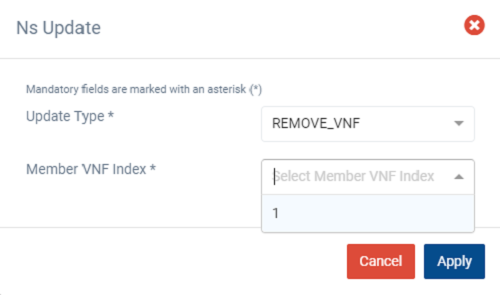
Fill in the form by selecting ‘REMOVE_VNF’ from the dropdown of ‘Update Type’ and the member vnf index of the VNF to be terminated and click ‘Apply’
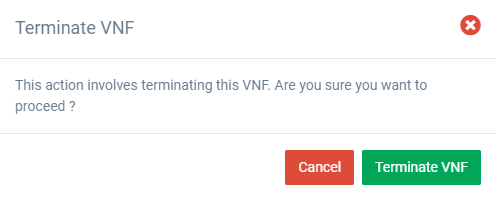
A warning message is displayed, click ‘Terminate VNF’ to proceed
Click ‘Cancel’ to cancel the termination operation
Redeploying a VNF from UI
Go to ‘NS Instances’ on the ‘Instances’ menu to the left
Next to the NS instance which the VNF to be redeployed is a part of, click on the ‘Action’ button.
From the dropdown actions, click on ‘NS Update’
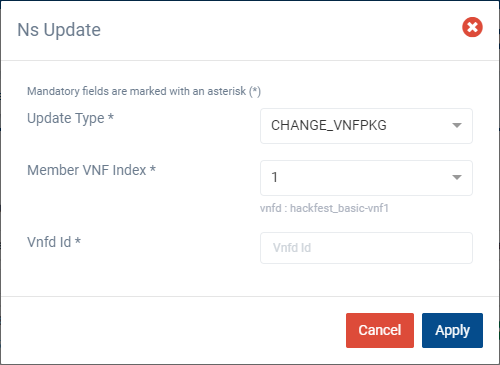
Fill in the form by selecting the following,
‘CHANGE_VNFPKG’ from the dropdown of ‘Update Type’
The member vnf index of the VNF to be updated
VNFDId for the update (Should be same as the vnfd-id of the VNF to be updated)
Finally, click ‘Apply’
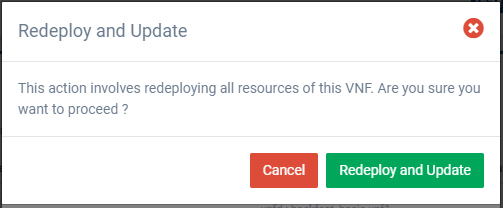
A warning message is displayed, click ‘Redeploy and Update’ to proceed
Click ‘Cancel’ to cancel the update operation
Advanced instantiation: using instantiation parameters
OSM allows the parametrization of NS or NSI upon instantiation (Day-0 and Day-1), so that the user can easily decide on the key parameters of the service without any need of changing the original set of validated packages.
Thus, when creating a NS instance, it is possible to pass instantiation parameters to OSM using the --config option of the client or the config parameter of the UI. In this section we will illustrate through some of the existing examples how to specify those parameters using OSM client. Since this is one of the most powerful features of OSM, this section is intended to provide a thorough overview of this functionality with practical use cases.
Specify a VIM network name for a NS VLD
In a generic way, the mapping can be specified in the following way, where vldnet is the name of the network in the NS descriptor and netVIM1 is the existing VIM network that you want to use:
--config '{vld: [ {name: vldnet, vim-network-name: netVIM1} ] }'
You can try it using one of the examples of the hackfest (packages: hackfest_basic_vnf, hackfest_basic_ns); images: ubuntu18.04) in the following way:
osm ns-create --ns_name hf-basic --nsd_name hackfest_basic-ns --vim_account openstack1 --config '{vld: [ {name: mgmtnet, vim-network-name: mgmt} ] }'
Specify a VIM network name for an internal VLD of a VNF
In this scenario, the mapping can be specified in the following way, where "1" is the member vnf index of the constituent vnf in the NS descriptor, internal is the name of internal-vld in the VNF descriptor and netVIM1 is the VIM network that you want to use:
--config '{vnf: [ {member-vnf-index: "1", internal-vld: [ {name: internal, vim-network-name: netVIM1} ] } ] }'
You can try it using one of the examples of the hackfest (packages: hackfest_multivdu_vnf, hackfest_multivdu_ns); images: ubuntu20.04) in the following way:
osm ns-create --ns_name hf-multivdu --nsd_name hackfest_multivdu-ns --vim_account openstack1 --config '{vnf: [ {member-vnf-index: "1", internal-vld: [ {name: internal, vim-network-name: mgmt} ] } ] }'
Specify a VIM network (provider network) to be created with specific parameters (physnet label, encapsulation type, segmentation id) for a NS VLD
The mapping can be specified in the following way, where vldnet is the name of the network in the NS descriptor, physnet1 is the physical network label in the VIM, vlan is the encapsulation type and 400 is the segmentation IDthat you want to use:
--config '{vld: [ {name: vldnet, provider-network: {physical-network: physnet1, network-type: vlan, segmentation-id: 400} } ] }'
You can try it using one of the examples of the hackfest (packages: hackfest_basic_vnf, hackfest_basic_ns); images: ubuntu18.04) in the following way:
osm ns-create --ns_name hf-basic --nsd_name hackfest_basic-ns --vim_account openstack1 --config '{vld: [ {name: mgmtnet, provider-network: {physical-network: physnet1, network-type: vlan, segmentation-id: 400} } ] }'
Specify IP profile information and IP for a NS VLD
In a generic way, the mapping can be specified in the following way, where datanet is the name of the network in the NS descriptor, ip-profile is where you have to fill the associated parameters from the data model ( NS data model ), and vnfd-connection-point-ref is the reference to the connection point:
--config '{vld: [ {name: datanet, ip-profile: {...}, vnfd-connection-point-ref: {...} } ] }'
You can try it using one of the examples of the hackfest (packages: hackfest_multivdu_vnf, hackfest_multivdu_ns); images: ubuntu20.04) in the following way:
osm ns-create --ns_name hf-multivdu --nsd_name hackfest_multivdu-ns --vim_account openstack1 --config '{vld: [ {name: datanet, ip-profile: {ip-version: ipv4 ,subnet-address: "192.168.100.0/24", gateway-address: "0.0.0.0", dns-server: [{address: "8.8.8.8"}],dhcp-params: {count: 100, start-address: "192.168.100.20", enabled: true}}, vnfd-connection-point-ref: [ {member-vnf-index-ref: vnf1, vnfd-connection-point-ref: vnf-data, ip-address: "192.168.100.17"}]}]}'
Specify IP profile information for an internal VLD of a VNF
In this scenario, the mapping can be specified in the following way, where vnf1 is the member vnf index of the constituent vnf in the NS descriptor, internal is the name of internal-vld in the VNF descriptor and ip-profile is where you have to fill the associated parameters from the data model (VNF data model):
--config '{vnf: [ {member-vnf-index: vnf1, internal-vld: [ {name: internal, ip-profile: {...} ] } ] }'
You can try it using one of the examples of the hackfest (packages: hackfest_multivdu_vnf, hackfest_multivdu_ns); images: ubuntu20.04) in the following way:
osm ns-create --ns_name hf-multivdu --nsd_name hackfest_multivdu-ns --vim_account openstack1 --config '{vnf: [ {member-vnf-index: vnf1, internal-vld: [ {name: internal, ip-profile: {ip-version: ipv4, subnet-address: "192.168.100.0/24", gateway-address: "0.0.0.0", dns-server: [{address: "8.8.8.8"}] ,dhcp-params: {count: 100, start-address: "192.168.100.20", enabled: true}}}]}]} '
Specify IP address and/or MAC address for an interface
Specify IP address for an interface
In this scenario, the mapping can be specified in the following way, where vnf1 is the member vnf index of the constituent vnf in the NS descriptor, ‘internal’ is the name of internal-vld in the VNF descriptor, ip-profile is where you have to fill the associated parameters from the data model (VNF data model), id1 is the internal-connection-point id and a.b.c.d is the IP that you have to specify for this scenario:
--config '{vnf: [ {member-vnf-index: vnf1, internal-vld: [ {name: internal, ip-profile: {...}, internal-connection-point: [{id-ref: id1, ip-address: "a.b.c.d"}] ] } ] }'
You can try it using one of the examples of the hackfest (packages: hackfest_multivdu_vnf, hackfest_multivdu_ns); images: ubuntu20.04) in the following way:
osm ns-create --ns_name hf-multivdu --nsd_name hackfest_multivdu-ns --vim_account openstack1 --config '{vnf: [ {member-vnf-index: vnf1, internal-vld: [ {name: internal, ip-profile: {ip-version: ipv4, subnet-address: "192.168.100.0/24", gateway-address: "0.0.0.0", dns-server: [{address: "8.8.8.8"}] ,dhcp-params: {count: 100, start-address: "192.168.100.20", enabled: true}}, internal-connection-point: [{id-ref: mgmtVM-internal, ip-address: "192.168.100.3"}]}]}]}'
Specify MAC address for an interface
In this scenario, the mapping can be specified in the following way, where "1" is the member vnf index of the constituent vnf in the NS descriptor, id1 is the id of VDU in the VNF descriptor and interf1 is the name of the interface to which you want to add the MAC address:
--config '{vnf: [ {member-vnf-index: "1", vdu: [ {id: id1, interface: [{name: interf1, mac-address: "aa:bb:cc:dd:ee:ff" }]} ] } ] } '
You can try it using one of the examples of the hackfest (packages: hackfest_basic_vnf, hackfest_basic_ns); images: ubuntu18.04) in the following way:
osm ns-create --ns_name hf-basic --nsd_name hackfest_basic-ns --vim_account openstack1 --config '{vnf: [ {member-vnf-index: vnf, vdu: [ {id: hackfest_basic-vnf, interface: [{name: vdu-eth0, mac-address: "52:33:44:55:66:21"}]} ] } ] } '
Specify IP address and MAC address for an interface
In the following scenario, we will bring together the two previous cases.
You can try it using one of the examples of the hackfest (packages: hackfest_multivdu_vnf, hackfest_multivdu_ns); images: ubuntu20.04) in the following way:
osm ns-create --ns_name hf-multivdu --nsd_name hackfest_multivdu-ns --vim_account openstack1 --config '{vnf: [ {member-vnf-index: vnf1, internal-vld: [ {name: internal , ip-profile: {ip-version: ipv4, subnet-address: "192.168.100.0/24", gateway-address: "0.0.0.0", dns-server: [{address: "8.8.8.8"}] , dhcp-params: {count: 100, start-address: "192.168.100.20", enabled: true} }, internal-connection-point: [ {id-ref: mgmtVM-internal, ip-address: "192.168.100.3"} ] }, ], vdu: [ {id: mgmtVM, interface: [{name: mgmtVM-eth0, mac-address: "52:33:44:55:66:21"}]} ] } ] } '
Force floating IP address for an interface
In a generic way, the mapping can be specified in the following way, where id1 is the name of the VDU in the VNF descriptor and interf1 is the name of the interface:
--config '{vnf: [ {member-vnf-index: vnf1, vdu: [ {id: id1, interface: [{name: interf1, floating-ip-required: True }]} ] } ] } '
You can try it using one of the examples of the hackfest (packages: hackfest_multivdu_vnf, hackfest_multivdu_ns); images: ubuntu20.04) in the following way:
osm ns-create --ns_name hf-multivdu --nsd_name hackfest_multivdu-ns --vim_account openstack1 --config '{vnf: [ {member-vnf-index: vnf1, vdu:[ {id: mgmtVM, interface: [{name: mgmtVM-eth0, floating-ip-required: True }]} ] } ] } '
Make sure that the target specified in vim-network-name of the NS Package is made available from outside to be able to use the parameter floating-ip-required.
Multi-site deployments (specifying different VIM accounts for different VNFs)
In this scenario, the mapping can be specified in the following way, where "1" and "2" are the member vnf index of the constituent vnfs in the NS descriptor, vim1 and vim2 are the names of vim accounts and netVIM1 and netVIM2 are the VIM networks that you want to use:
--config '{vnf: [ {member-vnf-index: vnf1, vim_account: vim1}, {member-vnf-index: vnf2, vim_account: vim2} ], vld: [ {name: datanet, vim-network-name: {vim1: netVIM1, vim2: netVIM2} } ] }'
You can try it using one of the examples of the hackfest (packages: hackfest_multivdu_vnf, hackfest_multivdu_ns); images: ubuntu20.04) in the following way:
osm ns-create --ns_name hf-multivdu --nsd_name hackfest_multivdu-ns --vim_account openstack1 --config '{vnf: [ {member-vnf-index: vnf1, vim_account: openstack1}, {member-vnf-index: "2", vim_account: openstack3} ], vld: [ {name: mgmtnet, vim-network-name: {openstack1: mgmt, openstack3: mgmt} } ] }'
Specifying a volume ID for a VNF volume
In a generic way, the mapping can be specified in the following way, where VM1 is the name of the VDU, Storage1 is the volume name in VNF descriptor and 05301095-d7ee-41dd-b520-e8ca08d18a55 is the volume id:
--config '{vnf: [ {member-vnf-index: vnf1, vdu: [ {id: VM1, volume: [ {name: Storage1, vim-volume-id: 05301095-d7ee-41dd-b520-e8ca08d18a55} ] } ] } ] }'
You can try it using one of the examples of the hackfest (packages: hackfest_basic_vnf, hackfest_basic_ns); images: ubuntu18.04) in the following way:
osm ns-create --ns_name hf-basic --nsd_name hackfest_basic-ns

With the previous hackfest example, according to [VNF data model](https://osm-download.etsi.org/repository/osm/debian/ReleaseEIGHTEEN/docs/osm-im/osm_im_trees/etsi-nfv-vnfd.html) you will add in VNF Descriptor:

```yaml
     volumes:
        - name: Storage1
          size: 'Size of the volume'
Then:
osm ns-create --ns_name hf-basic --nsd_name hackfest_basic-ns --vim_account openstack1 --config '{vnf: [ {member-vnf-index: vnf, vdu: [ {id: hackfest_basic-VM, volume: [ {name: Storage1, vim-volume-id: 8ab156fd-0f8e-4e01-b434-a0fce63ce1cf} ] } ] } ] }'
Adding additional parameters
Since OSM Release SIX, additional user parameters can be added, and they land at vdu:cloud-init (Jinja2 format) and/or vnf-configuration primitives (enclosed by <>). Here is an example of a VNF descriptor that uses two parameters called touch_filename and touch_filename2.
vnfd:
    ...
    vnf-configuration:
        config-primitive:
        -   name: touch
            parameter:
            -   data-type: STRING
                default-value: <touch_filename2>
                name: filename
        initial-config-primitive:
        -   name: config
            parameter:
            -   name: ssh-hostname
                value: <rw_mgmt_ip>  # this parameter is internal
            -   name: ssh-username
                value: ubuntu
            -   name: ssh-password
                value: osm4u
            seq: '1'
        -   name: touch
            parameter:
            -   name: filename
                value: <touch_filename>
            seq: '2'
And they can be provided with:
--config '{additionalParamsForVnf: [{member-vnf-index: vnf1, additionalParams: {touch_filename: your-value, touch_filename2: your-value2}}]}'
Specifying an affinity-or-anti affinity group
Affinity-or-anti-affinity groups may be defined in the VNF descriptor, in the df section, under affinity-or-anti-affinity-group.
The type may be affinity or anti-affinity, and the scope must be nfvi-node. VDU profiles may reference one of the defined affinity-or-anti-affinity-group. Notice that, in Openstack, only one group is allowed. The following example shows a VNF with two VDU, both assigned to the same affinity-group affinity-group-1. Both virtual machines will be then instantiated in the same host.
vnfd:
  description: A basic VNF descriptor w/ two VDUs and an affinity group
  df:
  - id: default-df
    instantiation-level:
    - id: default-instantiation-level
      vdu-level:
      - number-of-instances: 1
        vdu-id: affinity_basic-VM-1
      - number-of-instances: 1
        vdu-id: affinity_basic-VM-2
    vdu-profile:
    - id: affinity_basic-VM-1
      min-number-of-instances: 1
      affinity-or-anti-affinity-group:
      - id: affinity-group-1
    - id: affinity_basic-VM-2
      min-number-of-instances: 1
      affinity-or-anti-affinity-group:
      - id: affinity-group-1
    affinity-or-anti-affinity-group:
    - id: affinity-group-1
      type: affinity
      scope: nfvi-node
An existing server-group may be passed as an instantiation parameter to be used as affinity-or-anti-affinity-group. In this case, the server-group will not be created, but reused, and will not be deleted when the Network Service instance is deleted. The following example shows the syntax
--config '{additionalParamsForVnf: [{member-vnf-index: affinity-basic-1, affinity-or-anti-affinity-group: [{ id: affinity-group-1, "vim-affinity-group-id": "81b82372-bbd4-48d6-b368-4d0b9d04d592"}]}]}'
Where the id of the affinity-or-anti-affinity-group is the one in the descriptor, and the vim-affinity-group-id is the guid of the existing server-group in Openstack to be used (instead of being created).
Keeping Persistent Volumes
OSM supports three types of volumes: persistent, swap and ephemeral. Swap and ephemeral volumes are deleted together with the virtual machine.
Persistent volumes are used as an root disk or ordinary disk and could be kept in the Openstack Cloud environment upon virtual machine deletion by setting keep-volume flag true under vdu-storage-requirements in the VNFD. If the keep-volume is set to false or is not included in the descriptor, persistent volume is deleted together with virtual machine. A sample descriptor which keeps persistent volumes is given as follows:
vnfd:
  description: A basic VNF descriptor w/ one VDU and several volumes, keeping persistent volume
  df:
  - id: default-df
    instantiation-level:
    - id: default-instantiation-level
      vdu-level:
      - number-of-instances: 1
        vdu-id: keep-persistent-vol-VM
    vdu-profile:
    - id: keep-persistent-vol-VM
      min-number-of-instances: 1
  id: keep_persistent-volumes-vnf
  mgmt-cp: vnf-mgmt-ext
  product-name: keep_persistent-volumes-vnf
  vdu:
  - id: keep-persistent-vol-VM
    name: keep-persistent-vol-VM
    sw-image-desc: ubuntu20.04
    alternative-sw-image-desc:
    - ubuntu20.04-aws
    - ubuntu20.04-azure
    virtual-compute-desc: keep-persistent-vol-VM-compute
    virtual-storage-desc:
    - root-volume
    - persistent-volume
    - ephemeral-volume
  version: 1.0
  virtual-storage-desc:
  - id: root-volume
    type-of-storage: persistent-storage
    size-of-storage: 10
    vdu-storage-requirements:
      - key: keep-volume
        value: 'true'
  - id: persistent-volume
    type-of-storage: persistent-storage
    size-of-storage: 1
    vdu-storage-requirements:
      - key: keep-volume
        value: 'true'
  - id: ephemeral-volume
    type-of-storage: ephemeral-storage
    size-of-storage: 2
An existing persistent volume could be passed as an instantiation parameter by identifing the name of volume and vim-volume-id which is exact volume ID in the Openstack Cloud. vim-volume-id is only accepted as an instantiation parameter, it could not be provided in the descriptor. If the vim-volume-id is provided as a persistent volume, new persistent volume is not created, but reused. Existing volumes which are provided with vim-volume-id parameter are always kept without checking keep-volume flag, when the Network Service instance is deleted. The following example shows the syntax:
--config '{ vnf: [ {member-vnf-index: vnf-persistent-volumes, vdu: [ {id: keep-persistent-vol-VM, volume: [{"name": root-volume, vim-volume-id: 53c485d0-7f32-4675-919d-a3ccaf655629}, {"name": persistent-volume, vim-volume-id: 4391a6af-6e00-470c-960f-73213840431e}] } ] } ] }'
Where the name of the persistent-storage is the one in the descriptor, and the vim-volume-id is the ID of volume in Openstack to be used (instead of being created).
Creating a deployment with a multi-attach volume
OSM supports the usage of multi-attach volumes when working with multiples VDUs in the same deployment. This feature only works in the Openstack Cloud environment and needs to be activated beforehand. Using cinder, create the volume type multiattach and activate it using the following commands:
$ cinder type-create multiattach
$ cinder type-key multiattach set multiattach="<is> True"
Verify that the configuration was has been applied by using the following command:
$ cinder type-list
+--------------------------------------+-------------+---------------------+-----------+
| ID                                   | Name        | Description         | Is_Public |
+--------------------------------------+-------------+---------------------+-----------+
| b365d243-0c21-45e2-8e41-aa975c4bd78c | __DEFAULT__ | Default Volume Type | True      |
| fdbf0985-86ca-4691-a5ba-9acb752bfed4 | multiattach | -                   | True      |
+--------------------------------------+-------------+---------------------+-----------+
Now, build a descriptor according to this feature: set multiattach flag as true under vdu-storage-requirements in the VNFD, then, add the volume id to both vdu under virtual-storage-desc, so it will attach itself to both VMs. The following is an example of a descriptor which generates a multi-attach volume:
vnfd:
  description: A basic VNF descriptor w/ two VDU
  df:
  - id: default-df
    instantiation-level:
    - id: default-instantiation-level
      vdu-level:
      - number-of-instances: 1
        vdu-id: hackfest_basic-VM
      - number-of-instances: 1
        vdu-id: hackfest_basic-VM1
    vdu-profile:
    - id: hackfest_basic-VM
      min-number-of-instances: 1
      affinity-or-anti-affinity-group:
      - id: affinity-group-1
    - id: hackfest_basic-VM1
      min-number-of-instances: 1
      affinity-or-anti-affinity-group:
      - id: affinity-group-1
    affinity-or-anti-affinity-group:
    - id: affinity-group-1
      type: anti-affinity
      scope: nfvi-node
  ext-cpd:
  - id: vnf-cp0-ext
    int-cpd:
      cpd: vdu-eth0-int
      vdu-id: hackfest_basic-VM
  - id: vnf-cp1-ext
    int-cpd:
      cpd: vdu-eth0-int
      vdu-id: hackfest_basic-VM1
  id: hackfest_basic_multi-vnf
  mgmt-cp: vnf-cp0-ext
  product-name: hackfest_basic_multi-vnf
  sw-image-desc:
  - id: ubuntu18.04
    name: ubuntu18.04
    image: ubuntu18.04
  - id: ubuntu18.04-aws
    name: ubuntu18.04-aws
    image: ubuntu/images/hvm-ssd/ubuntu-artful-17.10-amd64-server-20180509
    vim-type: aws
  - id: ubuntu18.04-azure
    name: ubuntu18.04-azure
    image: Canonical:UbuntuServer:18.04-LTS:latest
    vim-type: azure
  - id: ubuntu18.04-gcp
    name: ubuntu18.04-gcp
    image: ubuntu-os-cloud:image-family:ubuntu-1804-lts
    vim-type: gcp
  vdu:
  - id: hackfest_basic-VM
    name: hackfest_basic-VM
    sw-image-desc: ubuntu18.04
    alternative-sw-image-desc:
    - ubuntu18.04-aws
    - ubuntu18.04-azure
    - ubuntu18.04-gcp
    virtual-compute-desc: hackfest_basic-VM-compute
    virtual-storage-desc:
    - root-volume
    - hackfest_basic-VM-storage
    int-cpd:
    - id: vdu-eth0-int
      virtual-network-interface-requirement:
      - name: vdu-eth0
        virtual-interface:
          type: PARAVIRT
  - cloud-init: |
        #cloud-config
        password: osmpass
        chpasswd: { expire: False }
        ssh_pwauth: True
    id: hackfest_basic-VM1
    name: hackfest_basic-VM1
    sw-image-desc: ubuntu18.04
    alternative-sw-image-desc:
    - ubuntu18.04-aws
    - ubuntu18.04-azure
    - ubuntu18.04-gcp
    virtual-compute-desc: hackfest_basic-VM-compute
    virtual-storage-desc:
    - root-volume
    - hackfest_basic-VM-storage
    int-cpd:
    - id: vdu-eth0-int
      virtual-network-interface-requirement:
      - name: vdu-eth0
        virtual-interface:
          type: PARAVIRT
  version: 1.0
  virtual-compute-desc:
  - id: hackfest_basic-VM-compute
    virtual-cpu:
      num-virtual-cpu: 1
    virtual-memory:
      size: 1.0
  virtual-storage-desc:
  - id: root-volume
    size-of-storage: 5
  - id: hackfest_basic-VM-storage
    type-of-storage: persistent-storage
    size-of-storage: 10
    vdu-storage-requirements:
    - key: multiattach
      value: true
In this case, the volume hackfest_basic-VM-storage will be created under the name shared-{virtual-storage-desc.id}-vnf and will be the shared between both VMs. To check if it worked, run the openstack volume list and check if it is multi-attached to both VDUs.
+--------------------------------------+-----------------------------------------------------------+-----------+------+-------------------------------------------------------------------------------------------------------------------------+
| ID                                   | Name                                                      | Status    | Size | Attached to                                                                                                             |
+--------------------------------------+-----------------------------------------------------------+-----------+------+-------------------------------------------------------------------------------------------------------------------------+
| 91bf5674-5b85-41d1-aa3b-4848e2691088 | shared-hackfest_basic-VM-storage-hackfest_basic_multi-vnf | in-use    |   10 | Attached to multi_test-vnf-hackfest_basic-VM1-0 on /dev/vdb Attached to multi_test-vnf-hackfest_basic-VM-0 on /dev/vdb  |
+--------------------------------------+-----------------------------------------------------------+-----------+------+-------------------------------------------------------------------------------------------------------------------------+
It is possible to add the the flag keep-volume so the volume will stay on Openstack after deleting the VM. Add the key in the vdu-storage-requirements to make it work:
vdu-storage-requirements:
- key: multiattach
  value: true
- key: keep-volume
  value: true
If the value for the keep-volume key is set to false, or if the key does not exist, the volume will be deleted from OpenStack along with the VMs when the NS (Network Service) is deleted.
Using existing flavors (OpenStack only)
Typically, OSM creates the flavors needed by the VDUs, which are specified by the virtual-compute-desc parameter in the VNFD. In some cases, flavors must contain a complex EPA configuration that is not supported by descriptors, so they need to be created manually in the VIM beforehand.
An existing flavor can be used by passing it’s ID to vim-flavor-id at the VDU level. The following example shows the syntax:
--config '{vnf: [ {member-vnf-index: "vnf", vdu: [ {id: hackfest_basic-VM, vim-flavor-id: "O1.medium" } ] } ] }'
Using Kubernetes-based VNFs (KNFs)
OSM supports Kubernetes-based Network Functions (KNF). This feature unlocks more than 20.000 packages that can be deployed besides VNFs and PNFs. This section guides you to deploy your first KNF, from the installation of multiple ways of Kubernetes clusters until the selection of the package and deployment.
Kubernetes installation
KNFs feature requires an operative Kubernetes cluster. There are several ways to have that Kubernetes running. From the OSM perpective, the Kubernetes cluster is not an isolated element, but it is a technology that enables the deployment of microservices in a cloud-native way. To handle the networks and facilitate the conection to the infrastructure, the cluster have to be associated to a VIM. There is an special case where the Kubernetes cluster is installed in a baremetal environment without the management of the networking part but in general, OSM consider that the Kubernetes cluster is located in a VIM.
For OSM you can use one of these three different ways to install your Kubernetes cluster:
OSM Kubernetes requirements
After the Kubernetes installation is completed, you need to check if you have the following components in your cluster.
Kubernetes Loadbalancer: to expose your KNFs to the network
Kubernetes default Storageclass: to support persistent volumes.
Adding kubernetes cluster to OSM
In order to test Kubernetes-based VNF (KNF), you require a K8s cluster, and that K8s cluster is expected to be connected to a VIM network. For that purpose, you will have to associate the cluster to a VIM target, which is the deployment target unit in OSM.
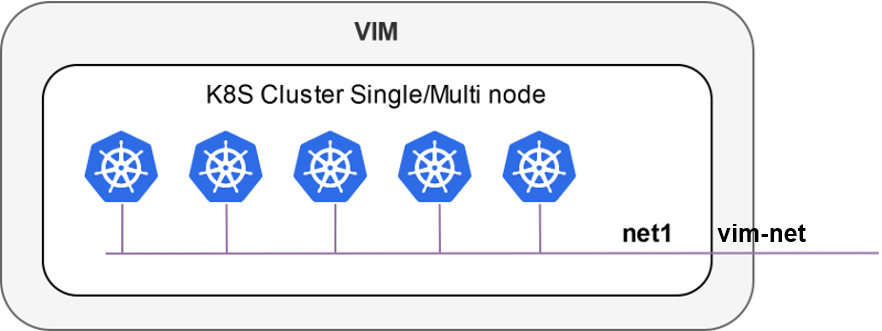
The following figures illustrate two scenarios where a K8s cluster might be connected to a network in the VIM (e.g. vim-net):
A K8s cluster running on VMs inside the VIM, where all VMs are connected to the VIM network
A K8s cluster running on baremetal and it is physically connected to the VIM network
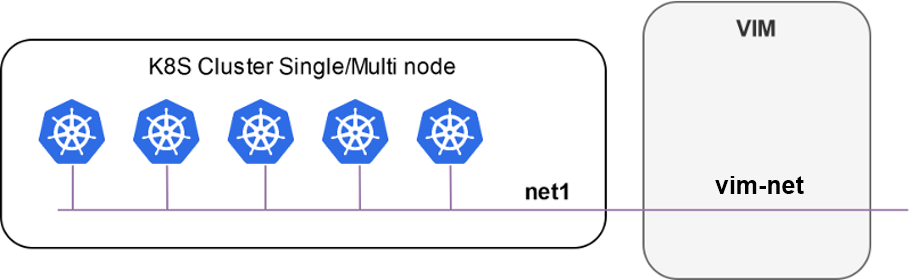
In order to add the K8s cluster to OSM, you can use these instructions:
osm k8scluster-add --creds clusters/kubeconfig-cluster.yaml --version '1.15' --vim <VIM_NAME|VIM_ID> --description "My K8s cluster" --k8s-nets '{"net1": "vim-net"}' cluster
osm k8scluster-list
osm k8scluster-show cluster
The options used to add the cluster are the following:
--creds: Is the location of the kubeconfig file where you have the cluster credentials--version: Current version of your Kubernetes cluster--vim: The name of the VIM where the Kubernetes cluster is deployed--description: Give a description to your Kubernetes cluster--k8s-nets: It is a dictionary of the cluster network, where thekeyis an arbitrary name and thevalueof the dictionary is the name of the network in the VIM. In case your k8s cluster is not located in a VIM, you could use ‘{net1: null}’
In some cases, you might be interested in using an isolated K8s cluster to deploy your KNF. Although these situations are discouraged (an isolated K8s cluster does not make sense in the context of an operator network), it is still possible by creating a dummy VIM target and associating the K8s cluster to that VIM target:
osm vim-create --name mylocation1 --user u --password p --tenant p --account_type dummy --auth_url http://localhost/dummy
osm k8scluster-add cluster --creds .kube/config --vim mylocation1 --k8s-nets '{k8s_net1: null}' --version "v1.15.9" --description="Isolated K8s cluster in mylocation1"
Adding repositories to OSM
You might need to add some repos from where to download helm charts required by the KNF:
osm repo-add --type helm-chart --description "Bitnami repo" bitnami https://charts.bitnami.com/bitnami
osm repo-add --type helm-chart --description "Cetic repo" cetic https://cetic.github.io/helm-charts
osm repo-add --type helm-chart --description "Elastic repo" elastic https://helm.elastic.co
osm repo-list
osm repo-show bitnami
KNF Service on-boarding and instantiation
KNFs can be on-boarded using Helm Charts or Juju Bundles. In this section, examples with Helm Chart and Juju Bundles are shown.
Note about deprecation of Helm v2
Helm v2 has been deprecated since 2020. Starting from OSM Release FIFTEEN, OSM no longer supports Helm v2. If the end user tries to deploy a KNF using Helm v2, the following error will be found:
ERROR: Error 422: {
    "code": "UNPROCESSABLE_ENTITY",
    "status": 422,
    "detail": "Error in pyangbind validation: {'error-string': 'helm_version must be of a type compatible with enumeration', 'defined-type': 'kdu:enumeration', 'generated-type': 'YANGDynClass(base=RestrictedClassType(base_type=six.text_type,                                     restriction_type=\"dict_key\",                                     restriction_arg={\\'v3\\': {}},), default=six.text_type(\"v3\"), is_leaf=True, yang_name=\"helm-version\", parent=self, choice=(\\'kdu-model\\', \\'helm-chart\\'), path_helper=self._path_helper, extmethods=self._extmethods, register_paths=True, namespace=\\'urn:etsi:osm:yang:augments:kdu\\', defining_module=\\'kdu\\', yang_type=\\'enumeration\\', is_config=True)'}"
  }
If you are the KNF provider and want to upgrade a helm chart from v2 to v3, follow the official documentation
KNF Helm Chart
Once the cluster is attached to your OSM, you can work with KNF in the same way as you do with any VNF. For instance, you can onboard the example below of a KNF consisting of a single Kubernetes deployment unit based on OpenLDAP helm chart.
git clone --recursive https://osm.etsi.org/gitlab/vnf-onboarding/osm-packages.git
cd osm-packages
osm nfpkg-create openldap_knf
osm nspkg-create openldap_ns
You can instantiate two NS instances:
osm ns-create --ns_name ldap --nsd_name openldap_ns --vim_account <VIM_NAME|VIM_ID>
osm ns-create --ns_name ldap2 --nsd_name openldap_ns --vim_account <VIM_NAME|VIM_ID> --config '{additionalParamsForVnf: [{"member-vnf-index": "openldap", additionalParamsForKdu: [{ kdu_name: "ldap", "additionalParams": {"replicaCount": "2"}}]}]}'
Check in the cluster that pods are properly created:
The pods associated to ldap should be using version
openldap:1.2.1and have 1 replicaThe pods associated to ldap2 should be using version
openldap:1.2.1and have 2 replicas
Now you can upgrade both NS instances:
osm ns-action ldap --vnf_name openldap --kdu_name ldap --action_name upgrade --params '{kdu_model: "stable/openldap:1.2.2"}'
osm ns-action ldap2 --vnf_name openldap --kdu_name ldap --action_name upgrade --params '{kdu_model: "stable/openldap:1.2.1", "replicaCount": "3"}'
Check that both operations are marked as completed:
osm ns-op-list ldap
osm ns-op-list ldap2
Check in the cluster that both actions took place:
The pods associated to ldap should be using version openldap:1.2.2
The pods associated to ldap2 should be using version openldap:1.2.1 and have 3 replicas
Rollback both NS instances:
osm ns-action ldap --vnf_name openldap --kdu_name ldap --action_name rollback
osm ns-action ldap2 --vnf_name openldap --kdu_name ldap --action_name rollback
Check that both operations are marked as completed:
osm ns-op-list ldap
osm ns-op-list ldap2
Check in the cluster that both actions took place:
The pods associated to ldap should be using version openldap:1.2.1
The pods associated to ldap2 should be using version openldap:1.2.1 and have 2 replicas
Delete both instances:
osm ns-delete ldap
osm ns-delete ldap2
Delete the packages:
osm nspkg-delete openldap_ns
osm nfpkg-delete openldap_knf
Optionally, remove the repos and the cluster
#Delete repos
osm repo-delete cetic
osm repo-delete bitnami
osm repo-delete elastic
#Delete cluster
osm k8scluster-delete cluster
Primitives in Helm Charts
Proxy charms are used to implement primitives on Helm KNFs. In the VNF descriptor we can set the list of services exposed by the Helm chart, and the information of those services will be passed to the Proxy charm.
vnfd:
  # ...
  kdu:
  - name: ldap
    helm-chart: stable/openldap
    # List of exposed services:
    service:
    - name: stable-openldap
If you are trying to connect to the exposed services from the Proxy charm, there should be connectivity between them. There are two options in terms of connectivity:
Proxy charm and Helm chart not living in the same K8s cluster. Proxy charms can live in LXD or in a K8s cluster different from where the Helm chart is deployed. In these cases, the recommended solution is to expose LoadBalancer services, so that the Proxy charm will have reachability to the service.
Proxy charm and Helm chart living in the same K8s cluster. In this case, you can expose also the ClusterIP services of your Helm chart, because the Proxy charm will be able to reach it.
The easiest way of creating a Proxy charm that is able to implement primitives to Helm chart is by the use of the osm-libs Charm Library. This is an example of an OpenLdap Helm-based KNF with primitives that uses the mentioned library.
KNF Juju Bundle
This is an example on how to onboard a service that uses a Juju Bundle. For this example the service to onboard is Squid, a web server application which provides proxy and cache services for protocols like HTTP or FTP.
git clone --recursive https://osm.etsi.org/gitlab/vnf-onboarding/osm-packages
cd osm-packages
osm nfpkg-create squid_metrics_cnf
osm nspkg-create squid_metrics_cnf_ns
You can instantiate the Network Service as follows:
osm ns-create --ns_name squid-ns --nsd_name squid_cnf_ns --vim_account <VIM_NAME|VIM_ID>
To check the status of the deployment you can run the following command:
osm ns-op-list squid-ns
+--------------------------------------+-------------+-------------+-----------+---------------------+--------+
| id                                   | operation   | action_name | status    | date                | detail |
+--------------------------------------+-------------+-------------+-----------+---------------------+--------+
| 364c1378-ba86-447e-ad00-93fc1bf1bdd5 | instantiate | N/A         | COMPLETED | 2020-02-24T13:49:03 | -      |
+--------------------------------------+-------------+-------------+-----------+---------------------+--------+
To remove the network service you can:
osm ns-delete squid-ns
How to Add Instantiation Parameters to KNF Juju Bundles
It is possible to set custom parameters to KDUs upon NS instantiation, without modifying the previously validated KNF packages.
Instantiation parameters will be added to the Juju Bundles using Overlays Bundles. Overlay Bundles allow you to customize settings in an upstream bundle for your own needs, without modifying the existing bundle directly. Juju Bundles and Overlay Bundles use the same YAML syntax. You can find the format of a bundle here: Juju Bundle Documentation.
First, you need to create a YAML file that will contain the instantiation parameters for your KDU. It must containt the following parameters:
# Additional parameters will be added to the VNF.
additionalParamsForVnf:
  # ID of the VNF.
  - member-vnf-index: squid_cnf
    # Additional parameters will be added to the KDU.
    additionalParamsForKdu:
      # ID of the KDU.
      - kdu_name : squid-metrics-kdu
        # Instantiation parameters will be added here.
        additionalParams:
          # “overlay” will be used as a keyword to identify the instantiation parameters.
          overlay:
            # The overlay starts here. Use same format as Juju Bundles.
            applications:
              squid:
                scale: 3
“overlay” is used as keyword to identify the Bundle Overlay.
You can modify the number of units to deploy or set custom machine constraints. However, OSM will not allow you to add new applications to the original bundle. All the applications in the overlay must exist on the original bundle.
The original Juju Bundle for squid-metrics-kdu, establishes only one unit for the squid application. In this example we set to 3 the number of units of the squid application of the squid-metrics-kdu KDU on the squid_cnf VNF.
Then, use the flag --config_file during NS instantiation to indicate the YAML file you just created:
osm ns-create --ns_name squid-ns --nsd_name squid_cnf_ns --vim_account <VIM_NAME|VIM_ID> --config_file <YAML_file_name>
Your squid-ns NS will be deployed including 3 units (instead of one), as specified in the instantiation parameters.
Alternatively, you can use the --config flag of osm ns-create command to specify the instantiation parameters as follows:
osm ns-create --ns_name squid-ns --nsd_name squid_cnf_ns --vim_account <VIM_NAME|VIM_ID> --config '{additionalParamsForVnf: [{member-vnf-index: squid_cnf, additionalParamsForKdu: [{ kdu_name: squid-metrics-kdu, additionalParams: { overlay: { applications: { squid: { scale: 3 } }}}}]}]}'
This approach is equivalent to using the --config_file flag.
How to prepare a NS that will use static Dual-Stack IP configuration for VNF connection points
Static dual stack assignment enables configuring and allocating IPv4 and IPv6 addresses to VNFs. Typically, IP addresses are provided as instantiation parameters in OSM, as it was described here. However, in some circumstances, it could be useful to configure static IPv6 and IPv4 addresses in the NS Descriptor.
Note: Static Dual-Stack IP allocation is supported only for VNFs deployed in Openstack VIM.
How to configure IPv4/IPv6 Dual Stack addresses statically in the NS descriptor
To configure dual stack IP addresses, add the required IPv4 and IPv6 addresses in the NS descriptor under “ip-address”,
virtual-link-connectivity:
- constituent-cpd-id:
  - constituent-base-element-id: vnf
    constituent-cpd-id: vnf-cp0-ext
    ip-address:
    - 192.168.1.20
    - 2001:db8::23e
To configure only a static IPv4 address, the following can be done:
virtual-link-connectivity:
- constituent-cpd-id:
  - constituent-base-element-id: vnf
    constituent-cpd-id: vnf-cp0-ext
    ip-address: 192.168.1.20
How to Launch NS with Dual Stack IP (IPv4/IPv6) using SOL003 VNFM Interface
First, use API endpoint /osm/vnflcm/v1/vnf_instances to create a VNF object with a POST message, providing all the details mentioned in below sample payload. Make sure to add “ip-address” key and value with dual stack IP addresses. Behind the scenes, this creates a VNF and a NS package in OSM.
{
  "vnfdId":"cirros_vnfd",
  "vnfInstanceName":"rahul-instance",
  "vnfInstanceDescription":"Test vnfm instance description",
  "vimAccountId":"b4275db0-3d1c-46f8-a42a-2b5425b07fb1",
  "additionalParams":{
    "virtual-link-desc":[
      {
        "id":"mgmtnet",
        "mgmt-network":true,
        "vim-network-name": "IPv6"
      }
     ],
     "constituent-cpd-id":"vnf-cp0-ext",
     "ip-address": ["2001:dc9::5", "199.166.155.66"],
     "virtual-link-profile-id":"mgmtnet"
  }
}
Then, use instantiation API /osm/vnflcm/v1/vnf_instances/<vnfId>/instantiate to launch the NS. Mention all the details in payload as shown in below sample.
{
   "vnfName": "sample-instance",
   "vnfDescription": "vnf package",
   "vnfId": "28c8c438-ca9a-4565-9b02-bcfd3ba6c4d6",
   "vimAccountId": "b4275db0-3d1c-46f8-a42a-2b5425b07fb1"
}