Understanding the Workflow with OSM tools
Login to OSM portal
To be able to use all the tools required in the development cycle, you need to be authenticated in ETSI portal.
Go to OSM portal: https://osm.etsi.org/
Log in using your username and password
Note:
If you are contributing on behalf of your company, you should login with your ETSI Online Account (EOL).
If your company is not yet an OSM Member or Participant, you can check here how to join OSM as an organization
If your company has already joined OSM but you do not have an EOL account yet, you can request an EOL account
If you are an individual contributor, you can create your OSM account online.
If you need any help, contact us at OSMsupport@etsi.org
Reporting a bug on Bugzilla
Go to the OSM Portal and click on Bugzilla menu on the portal menu bar. Or simply go to OSM Bugzilla
Click on “new” on Bugzilla menu bar.
Choose the product, e.g. “OSM”.
Complete the bug form. If you know, choose the component, e.g. UI, SO, RO, Documentation/Wiki, etc.
Enter the bug summary, description, attachment, etc.
Click on the “Submit Bug” button to confirm.
A bug id is generated (e.g. Bug 6 -Small Error)
Contributing code
Prepare your environment
SSH key
Create an SSH key pair if you don’t have one:
ssh-keygen
Accept the default path (~/.ssh/id_rsa) and enter a passphrase if desired.
Add your public key to GitLab:
Go to https://osm.etsi.org/gitlab/ and sign in with your EOL account.
Under your profile, go to Edit Profile → SSH Keys.
Open
~/.ssh/id_rsa.pub, copy its contents and paste them into the Key field.Set a title and an expiry date (maximum one year).
Click Add key.
Note: id_rsa.pub is your public key and can be shared; id_rsa is your private key and must be kept secret.
SSH client configuration
Add the following to your ~/.ssh/config:
Host osm.etsi.org
  Hostname osm.etsi.org
  User git
  IdentityFile ~/.ssh/id_rsa
  PubkeyAcceptedAlgorithms +ssh-rsa
  HostkeyAlgorithms +ssh-rsa
Test your SSH connection:
ssh -p 29419 osm.etsi.org
Git configuration
Configure your git username and email to match your GitLab profile:
git config --global user.name <your_etsi_user>
git config --global user.email <email>
If you use the same machine for other projects, you can restrict these settings to a specific repository:
cd <osm_project_local_folder>
git config --local user.name <your_etsi_user>
git config --local user.email <email>
Verify your configuration:
git config -l
Clone a project
Find all OSM projects at https://osm.etsi.org/gitlab/dashboard/projects/member. Clone using SSH:
git clone ssh://git@osm.etsi.org:29419/osm/<project>.git
To clone all the main OSM projects at once:
mkdir -p ~/OSM/
cd ~/OSM
BRANCH=master
for PROJECT in common devops IM LCM MON N2VC NBI NG-SA NG-UI osmclient PLA POL RO tests
do
  git clone ssh://git@osm.etsi.org:29419/osm/${PROJECT}.git
  git -C ${PROJECT} checkout ${BRANCH}
done
Configure your Git environment
Configure your git username globally:
git config --global user.name <username>
Configure your git email address:
git config --global user.email <email>
Check your git configuration:
git config --list
Note: Your email address will be visible on commits. If you’d like to keep it private, you can mask it: if your email is name@company.com, set user.email to hidden@company.com. This lets other users identify you by username while Git stats still track your company’s contributions by domain.
In case you are using git in the same computer for other open source projects, you can restrict your git variables to the local folder:
git config --local user.name <username>
git config --local user.email <email>
Python 3
All OSM contributions must use Python 3.10+.
python -V
# Python 3.10.x
You can manage Python versions with pyenv.
License Headers
New source files must include the following Apache 2.0 license header:
#######################################################################################
# Copyright ETSI Contributors and Others.
#
# Licensed under the Apache License, Version 2.0 (the “License”);
# you may not use this file except in compliance with the License.
# You may obtain a copy of the License at
#
#    http://www.apache.org/licenses/LICENSE-2.0
#
# Unless required by applicable law or agreed to in writing, software
# distributed under the License is distributed on an “AS IS” BASIS,
# WITHOUT WARRANTIES OR CONDITIONS OF ANY KIND, either express or
# implied.
# See the License for the specific language governing permissions and
# limitations under the License.
#######################################################################################
Make a change — Git Flow
OSM follows a Git Flow model. The master branch and version branches (e.g. v14.0, v16.0, v18.0) are protected. All contributions must go through a Merge Request.
Start from an up-to-date local copy of the target branch:
cd <osm_project_local_folder>
git checkout master
git pull
git checkout -b <branch_name>
Branch names should follow conventional commits notation, e.g. feat/add-new-vim, fix/fix-ro-crash, docs/update-readme.
Make your changes, then commit with the -s flag (required — it adds the Signed-off-by line):
git add <files>
git commit -s -m “<commit_message>”
Developer’s Certificate of Origin
The -s flag certifies that you wrote the contribution or have the right to submit it as open source, by adding:
Signed-off-by: Random J Developer <random@developer.example.org>
This certifies compliance with the Developer’s Certificate of Origin 1.1:
Developer’s Certificate of Origin 1.1

By making a contribution to this project, I certify that:

(a) The contribution was created in whole or in part by me and I
    have the right to submit it under the open source license
    indicated in the file; or

(b) The contribution is based upon previous work that, to the best
    of my knowledge, is covered under an appropriate open source
    license and I have the right under that license to submit that
    work with modifications, whether created in whole or in part
    by me, under the same open source license (unless I am
    permitted to submit under a different license), as indicated
    in the file; or

(c) The contribution was provided directly to me by some other
    person who certified (a), (b) or (c) and I have not modified
    it.

(d) I understand and agree that this project and the contribution
    are public and that a record of the contribution (including all
    personal information I submit with it, including my sign-off) is
    maintained indefinitely and may be redistributed consistent with
    this project or the open source license(s) involved.
Push your contribution to GitLab
Before pushing, rebase on top of the latest target branch to avoid conflicts:
git pull --rebase origin master
Push your branch:
git push --set-upstream origin <branch_name>
Then open a Merge Request on GitLab targeting master (or the appropriate version branch).
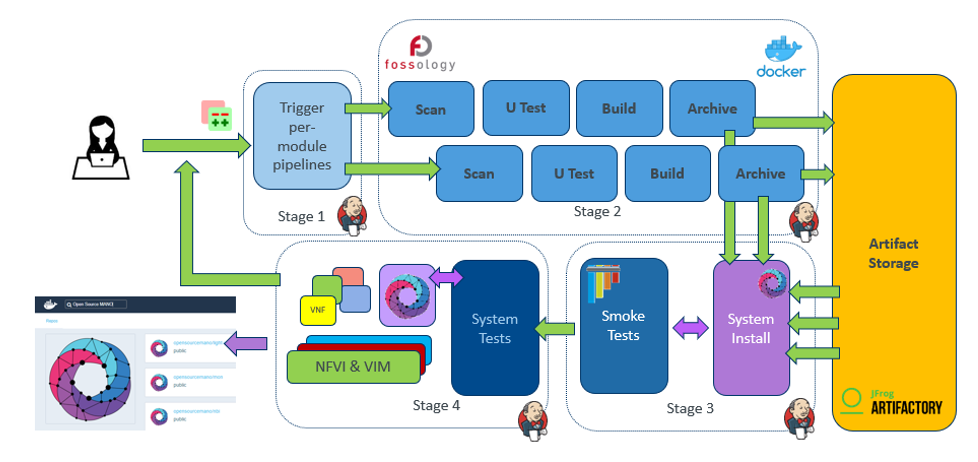
Continuous Integration
Every push to a branch with an open Merge Request triggers a Jenkins CI job named <repo>-stage_1-mb (e.g. osmclient-stage_1-mb). The pipeline runs:
Licence scan
Unit tests (linting + tests + changelog check)
Build and push image
Common E2E tests (spawns a remote VM, installs OSM, runs robot tests)
Promote image (on success)
You can monitor the job at https://osm.etsi.org/jenkins/job/<repo>-stage_1-mb/.
Jenkins reports the result back to the Merge Request. If the pipeline fails, fix the issue, push a new commit or an amended one, and push again.
The recommended way to validate locally before pushing is:
./devops-stages/stage-test.sh
This is equivalent to running tox in most projects. See Testing before committing for details.
Code Review
Once the pipeline passes, other contributors and MDG Committers can review and comment on the MR. The MDG Leader (MDL) gives the final approval and merges the MR.
Approval from TSC
Explicit TSC approval is required for code changes that affect:
Repositories controlled by the TSC (e.g. IM, NBI and SOL005 repos in the IM/NBI module)
Any repository without an active MDL (e.g. because the MDL stepped down and there is no interim MDL)
To get TSC approval:
Get at least two approvals from other community members on the MR.
Send an e-mail to
OSM_MDL@list.etsi.orgwith subject[TSC APPROVAL] {change summary}and body:1. **Change(s)** Link to the MR(s) in GitLab. 2. **Purpose** Purpose and benefits of the change (brief, one line is ok) 3. **References** Including references to the related bug or feature. 4. **Other modules impacted** Other modules that will/might be impacted (or None). This is not only for impact due to code dependencies, but any impact in OSM functionality. This is important to evaluate the risks of the change(s), communicate them and coordinate mitigation.
NOTE:
Indicate if any other MRs need to be merged before or at the same time as this one.
Indicate if due to the complexity of the change a dedicated branch is recommended (this requires an extra process, therefore, use only when required).
Indicate if the change needs to be applied to other branches, and include the cherry-picks in the Change(s) section.
TSC will not cherry-pick to specific branches — if you need the changes in several branches, include those in the approval request.
TSC will review and approve via the GitLab MR.
Amending a contribution
If you need to update a change after pushing (e.g. to address review comments):
Pull the latest changes and rebase:
git pull --rebase origin master
Fix the code and stage the files:
git add <file>
Either amend the last commit or add a new one:
git commit --amend   # update the last commit; keep the commit message if it was already reviewed
# or
git commit -s -m “<new commit message>”
Push the updated branch. After a rebase or
--amend, the history has been rewritten, so a regular push will be rejected — use--force-with-lease:git push --force-with-lease
Note:
--force-with-leaseis safer than--force— it rejects the push if someone else has pushed to the same branch in the meantime, preventing accidental loss of their work.
Amending a change with dependent commits
If you have a stack of commits and need to amend one that is not the last:
Start an interactive rebase over the relevant commits:
git rebase -i HEAD~<N>
Mark the commit to fix as
edit, leave the others aspick.Fix the code, stage, and amend:
git add <file> git commit --amend git rebase --continue
Resolve any conflicts that arise in subsequent commits, then continue:
git add <file>   # after resolving conflicts
git rebase --continue
Repeat until the rebase completes. Use
git rebase --abortto cancel at any point.Push the updated branch:
git push --force-with-lease
Proposing a new Feature
Project Features go trough a discussion and approval process. To propose a new Feature, OSM uses Gitlab.
Go to https://osm.etsi.org/gitlab/osm/features/-/issues/new. You need to be authenticated.
Create a new Issue for your feature
Title: A high level description of your feature (see some other examples in Gitlab)
Type: Issue
Description: The feature description, following the auto-generated template.
A feature request is about functionality, not about implementation (that is the design)
Describe WHAT you are proposing, and WHY it is important.
DO NOT describe HOW to do it.
Pick Labels If you foresee the OSM modules that might be affected by the feature, pick labels for them. Otherwise, leave it empty.
PLEASE: Do not set the following:
EPIC
Asignee
Milestone
Weight
Due Date
Submit Issue
Interact with the TSC and the Community through the issue. TSC will review your Feature. If it makes sense and its purpose is clear, it will be approved. Otherwise, TSC will provide questions for clarification.
Funnel of a feature
Once approved, the feature could transition through the following steps
Aproved: Approved by TSC to be included in OSM
Design: In the design phase, where HOW do to it will be discussed
Development: It is being implemented
Testing: Developer is testing it
Review: Community s reviewing it
Completed: It is completed, and merged
Abandoned: It was abandoned
An approved features is not a guarantee for implementation. Implementing a feature requires resources, and resources come from the companies integrating the Community, which might have prioritized the development of other features instead base on their own interests and the interests expressed by the EUAG and the TSC.
Once a Feature is accepted for inclusion in a specific Release, the ticket will be included in the respective EPIC
Release 1
…
Release 10
Release 11
…
For instance, to see Features included in Release11, check EPIC Release11
Designing a feature
Once a feature has been approved, the design phase starts. A design pad can be created in ETSI etherpad. The name of the pad must be “featureXXXX” where XXXX is the number of change in Gitlab. Once created, it is good practice to add the link as a comment to the feature in Gitlab.
For writing the design, you can check one of the previous designs, e.g. feature 10593, or use the design template below.
# XXXX FEATURE NAME

## CLARIFICATIONS TO EXPECTED E2E BEHAVIOUR

...

## REFERENCES

...

## ASSUMPTIONS

...

## IMPACTED MODULES

List of impacted modules: IM, RO, LCM, NBI, N2VC, common, MON, POL, NG-UI, osmclient, etc.

## MODULE1 IMPACT

...

## MODULE2 IMPACT

...

## TESTING

...
The design is expected to be socialized with the relevant stakeholders (e.g. MDLs and TSC). Dedicated slots can be allocated in the TECH calls on a per-request basis.
OSM CI/CD
Join the Community
Join the OSM Community Slack Workspace
Subscribe the OSM TECH mailing list
Get your organisation / project listed in the OSM Ecosystem